
The very first post to test how well does this blog behave!
Table of Contents
The story behind
Well, what else would it be if not a typical story of:
- This is easy, lets just deploy a ready Markdown renderer with a blog plugin
- That did not work, lets build our own frontend with NextJS like all the cool kids do
- Lets think carefully this time. There are actual blog starter projects made by professionals, and there is no reason not to use them, so long as they are fitting our use case.
And here we are! A blog made with Astro based starter made by a talented frontend dev, but powered by my ingenious backend skills! So it includes a dedicated CMS, a dedicated What you see is what you get editor, and a multi cloud hosting and deployment solution that reads the content from CMS, adds summary by an LLM, then prepares a image generation prompt based on that summary, and finally creates a headline image! The content of the post is fully human, with my own choice of images and content 😃
Source code
To see how this blog was built, you need to visit 3 repos:
This is where the code for the website itself lives. It’s based on a starter project, you can find a link to it in the footer.
This is where the Webiny CMS, the “backend” of this blog lives. It has been extended to support markdown generation with re-mark support, and a kinda WYSIWYG editor.
And finally, this is where the deployment magic with AI sprinkle happens. The CMS has a “on post publish” hook that calls the pipeline orchestrator (AWS Step Function) which fetches the content, does a summary, generates an image prompt, generates image for the header of the post, and generates another image for the hero card that is based on the header image. Then its all uploaded to the CMS and finally github action is called to build and deploy the website to Cloudflare Pages.
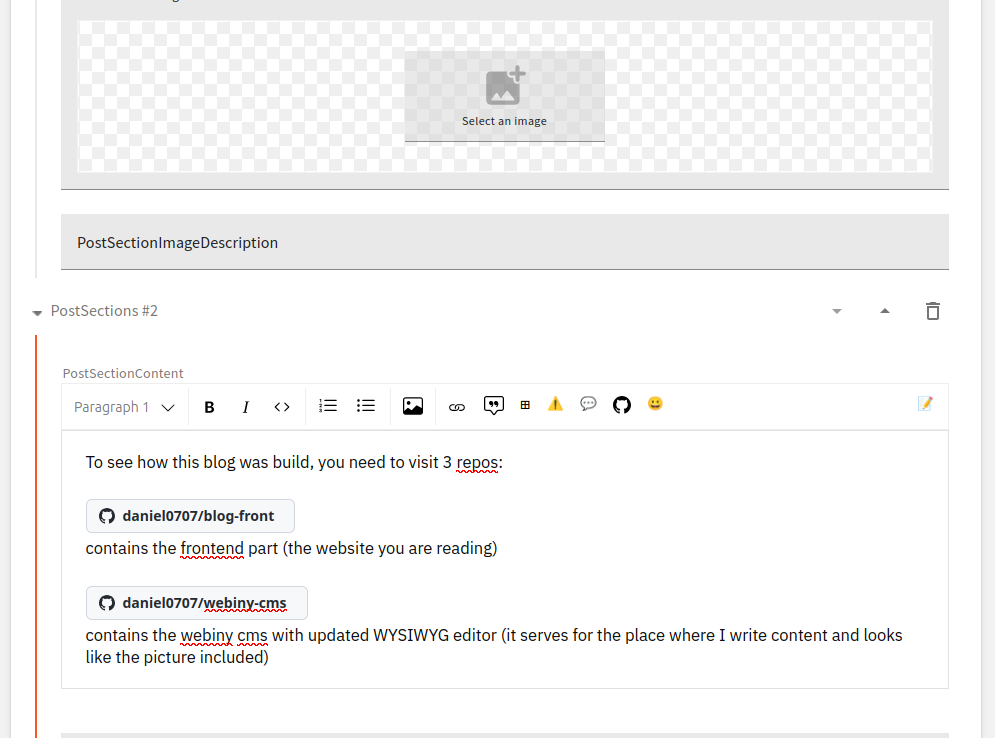
Since the post does not have a description in the frontmatter, the first paragraph is used.
Theming
Use your favorite editor theme for your blog!
Theming for the website comes from builtin Shiki themes found in Expressive Code. You can view them here. A website can have one or more themes, defined in src/site.config.ts. There are three theming modes to choose from:
single: Choose a single theme for the website. Simple.light-dark-auto: Choose two themes for the website to use for light and dark mode. The header will include a button for toggling between light/dark/auto. For example, you could choosegithub-darkandgithub-lightwith a default of"auto"and the user’s experience will match their operating system theme straight away.select: Choose two or more themes for the website and include a button in the header to change between any of these themes. You could include as many Shiki themes from Expressive Code as you like. Allow users to find their favorite theme!
When the user changes the theme, their preference is stored in
localStorageto persist across page navigation.
Code Blocks
Let’s look at some code block styles:
def hello_world():    print("Hello, world!")


hello_world()def hello_world(): print("Hello, world!")
hello_world()python hello.pyAlso some inline code: 1 + 2 = 3. Or maybe even (= (+ 1 2) 3).
See the Expressive Code Docs for more information on available features like wrapping text, line highlighting, diffs, etc.
Basic Markdown Elements
- List item 1
- List item 2
Bold text
Italic text
Strikethrough text
In life, as in art, some endings are bittersweet. Especially when it comes to love. Sometimes fate throws two lovers together only to rip them apart. Sometimes the hero finally makes the right choice but the timing is all wrong. And, as they say, timing is everything.
- Gossip Girl
| Name | Age | City |
|---|---|---|
| Alice | 30 | New York |
| Bob | 25 | Los Angeles |
| Charlie | 35 | Chicago |
Images

s this')Admonitions
:::notetesting123:::Character Chats
:::duck[https://cms-api-dev.vahla.fi/files/694ef175c87f68000208a143/duck.webp.png]**Did you know?** You can easily create custom character chats for your blog with MultiTerm!:::Character Conversations
When there are multiple character chats in a row, the order of the chat image and chat bubble reverses to give the chat more of a back-and-forth appearance.
:::owl[https://cms-api-dev.vahla.fi/files/694ef185c87f68000208a145/owl.webp.png]This is a cool feature!:::


:::unicorn[https://cms-api-dev.vahla.fi/files/694ef198c87f68000208a147/unicorn.webp.png]I agree!:::You can specify the alignment (left or right) to override the default left, right, left, ... ordering.
:::unicorn[https://cms-api-dev.vahla.fi/files/694ef198c87f68000208a147/unicorn.webp.png]{align="right"}Over here, to the right!:::GitHub Cards
GitHub overview cards heavily inspired by Astro Cactus.
::github{repo="stelcodes/multiterm-astro"}::github{user="withastro"}Emoji 🤩
Emojis can be added in markdown by including a literal emoji character or a GitHub shortcode. You can browse an unofficial database here.
Good morning! :sleeping: :coffee: :pancakes:Good morning! 😴 ☕ 🥞
All emojis (both literal and shortcoded) are made more accessible by wrapping them in a
spantag like this:>html<span role="img" aria-label="coffee">☕️</span>>At the time of writing, emoji v16 is not supported yet. These emojis can be included literally but they do not have shortcodes and will not be wrapped.
TEST
HEADER
QUOTE
NEXT LINE